Dreem MCP

Generate product photos inside Claude

Connect the Dreem MCP server once, then ask your AI assistant — in plain English — to turn a single product photo into on-model shots, ghost-mannequin images, packshots, and video. No dashboard to learn, no code to write.

Server URL https://mcp.dreem.ai/mcp · Free to try · No card

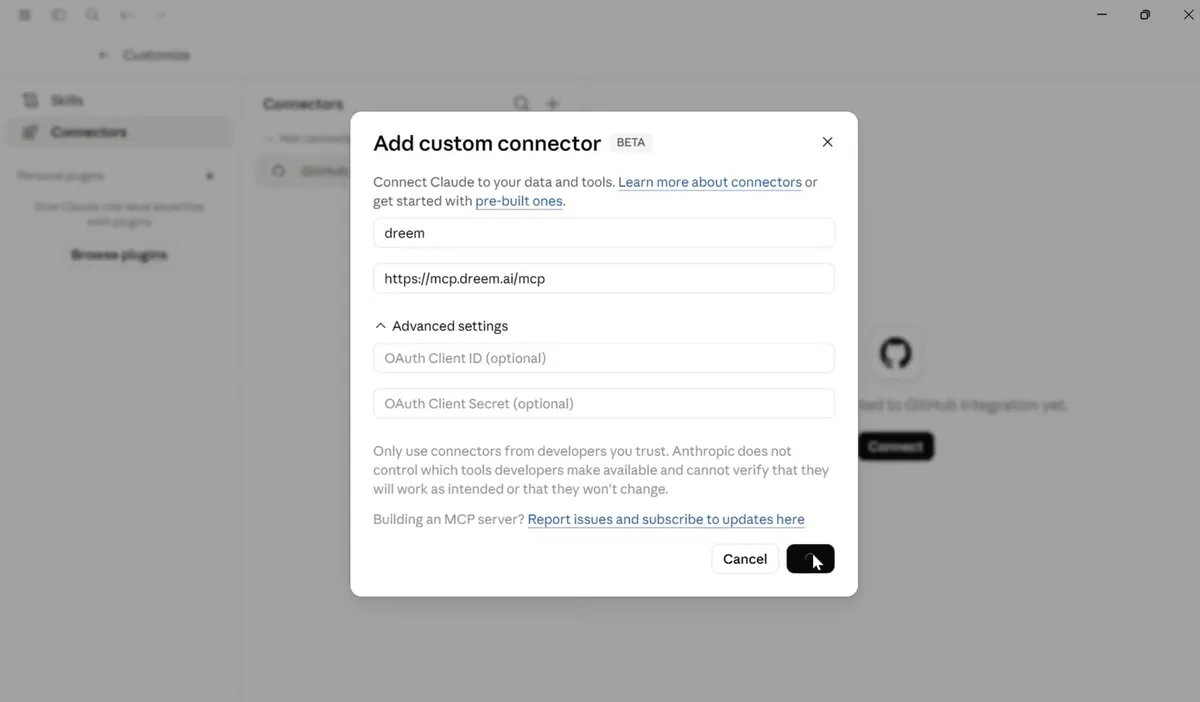
Claude's Add custom connector dialog with the name dreem and the server URL https://mcp.dreem.ai/mcp
1 URL to connect, then you're done
Plain English no code, no new dashboard
Full kit on-model, ghost, packshot, video

Dreem works inside your assistant.
Claude keeps the whole job in one chat.
More shots. No new tool. Plain English.

Claude
Refine
Product photo

Drag into chat

What you have

Prompt

Ask in plain English

Generate

On-model, ghost, video

Dreem MCP

Result

Image in the chat

Use it

Download or publish

Any MCP client

Claude, Cursor…

One illustrative flow — connect the Dreem MCP once, then generate from any MCP-compatible assistant without leaving the conversation.

How it works

Connect once, then just ask

  1. 01
    Claude's Add custom connector dialog with the Dreem MCP server URL

    Add the Dreem MCP server

    In Claude, open Connectors and choose Add custom connector. Name it dreem, paste https://mcp.dreem.ai/mcp, and click Connect.

  2. 02
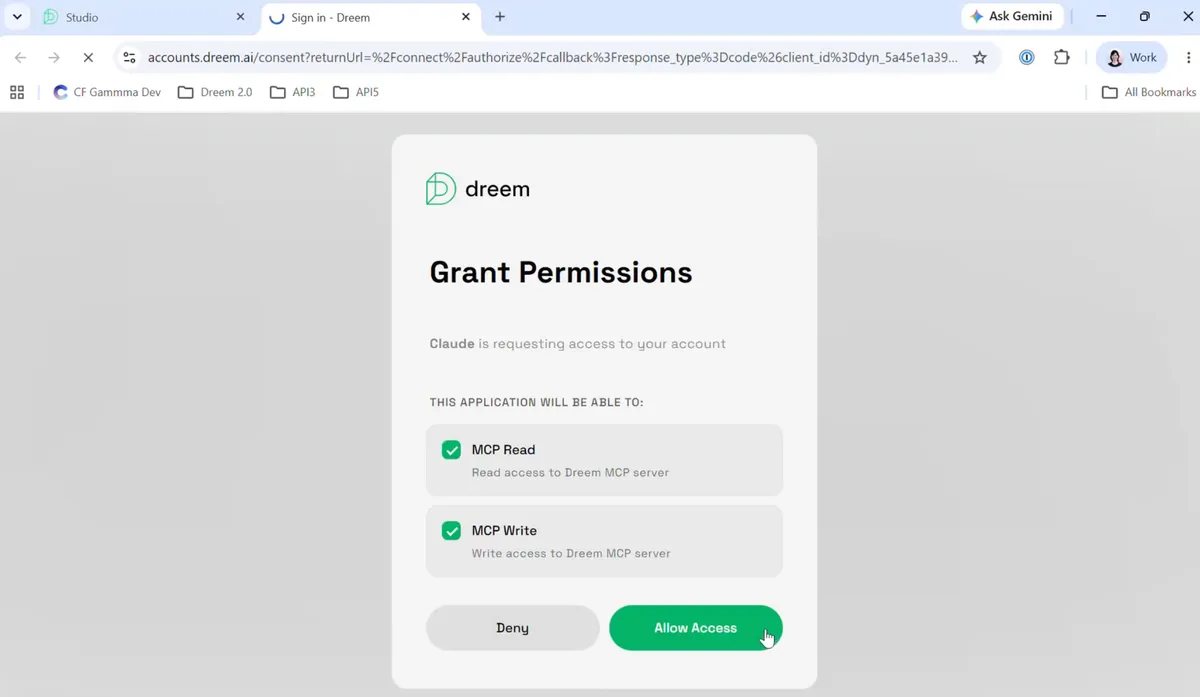
    Dreem's Grant Permissions screen showing MCP read and write access with an Allow Access button

    Approve read & write access

    Approve MCP read and write so your assistant can generate on your Dreem account. This is a one-time grant.

  3. 03
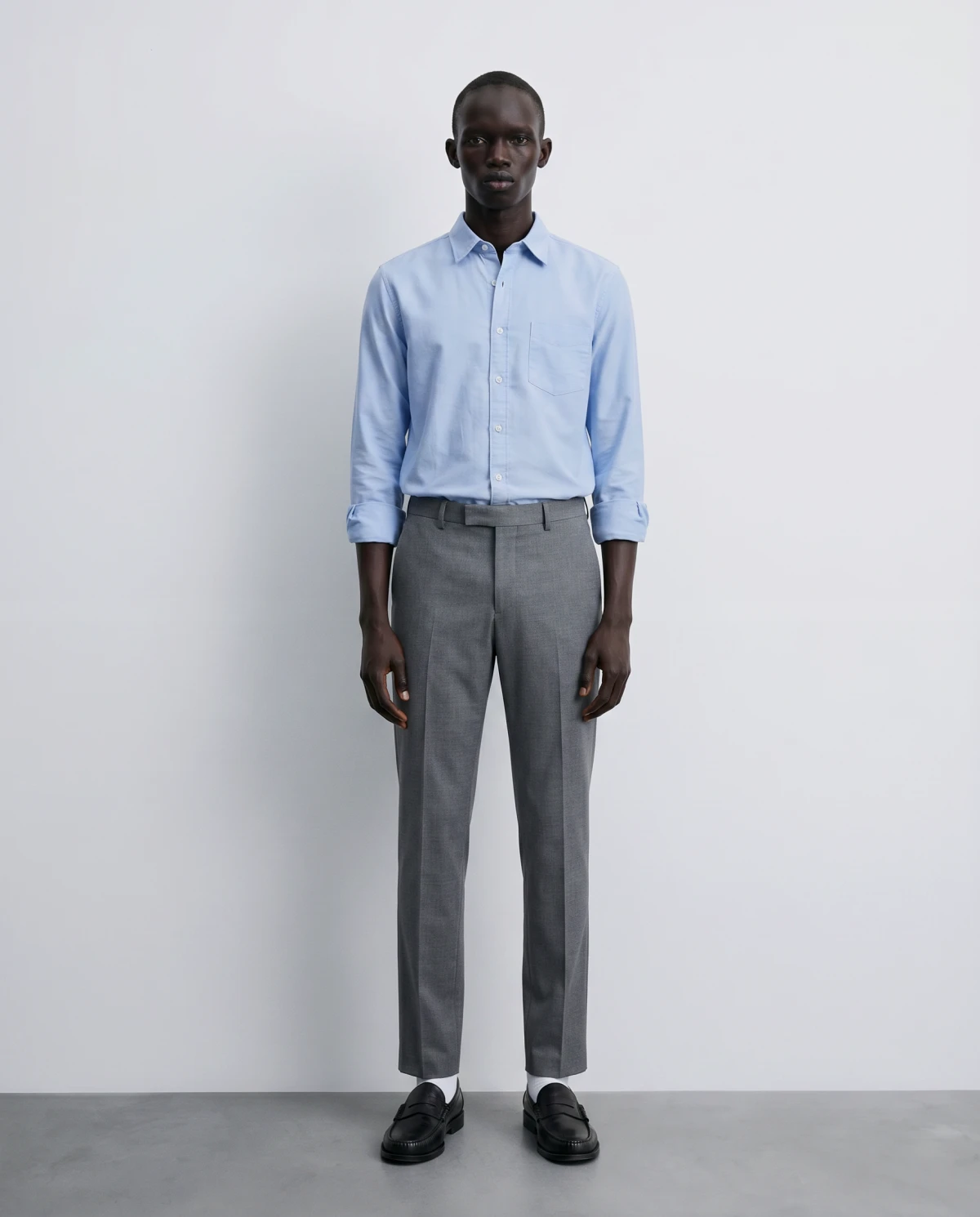
    An on-model product shot Dreem generated from a single flat product photo

    Ask for shots in plain English

    Upload a product photo and ask for what you need — an on-model shot, a ghost-mannequin image, a packshot, or a short video. Dreem generates it and returns it in the chat.

The integration

What is the Dreem MCP?

Dreem is a product-photography engine built for apparel and wearables. The Dreem MCP exposes that engine through an MCP server — the Model Context Protocol, the open standard that lets AI assistants like Claude call external tools directly. Connect the server once at https://mcp.dreem.ai/mcp, and your assistant can generate Dreem shots for you without you ever leaving the conversation.

It means there's no separate app to switch to and no UI to learn. You describe the shot you want the way you'd describe it to a teammate, and the work happens on your Dreem account behind the scenes.

Why generate from your assistant

Most product-photo workflows make you leave whatever you're doing, open a tool, upload, configure, export, and come back. With the MCP, the generation lives where you're already working. Drafting a product description in Claude? Ask for the matching on-model shot in the same thread. Iterating on a launch? Generate the ghost-mannequin image and the packshot side by side without context-switching.

And because it's the same Dreem engine underneath, everything it produces — on-model shots, ghost-mannequin images, packshots, short video — comes back consistent with the rest of your catalog.

What it's good at — and what to know

The honest version, because overselling helps no one.

Strong today

  • One-time connect, then plain-language requests — no code
  • The full Dreem kit from a single product photo
  • Consistent output that matches shots made anywhere else in Dreem

Good to know

  • Built for apparel and wearables — things people wear
  • You need a Dreem account; generations use your plan's credits
  • Setup shown here uses Claude's custom connector; other MCP clients use the same URL

Good to know

Frequently asked questions

What is the Dreem MCP?
The Dreem MCP is a Model Context Protocol server at https://mcp.dreem.ai/mcp. MCP is the open standard that lets AI assistants call external tools directly, so once it's connected, an assistant like Claude can generate Dreem product photography for you from inside the chat.
Which AI assistants work with the Dreem MCP?
Any MCP-compatible client. The setup documented here uses Claude's custom connector, which is the most common path today. As more assistants adopt MCP, the same server URL works with them too.
Do I need coding skills to use it?
No. You connect the Dreem MCP server once through your assistant's custom connector settings, then ask for shots in plain English. There's no code to write and no separate dashboard to learn.
What can I generate through the Dreem MCP?
The same things Dreem makes anywhere: on-model shots on a virtual model, ghost-mannequin (invisible mannequin) images, clean packshots, and short product video — all from a single product photo of apparel or wearables.
How much does it cost?
Connecting the MCP is free, and you can try Dreem for free. Generations run on credit-based usage on a Dreem subscription. See the pricing page for current plans.